

How to Onboard a New IT Provider: Managed Service Provider Onboarding Process and What to Expect in the First 90 Days
Onboarding a new IT provider can be a transformative experience for businesses, especially in today’s fast-paced digital landscape. This process involves a series of strategic steps designed to ensure a seamless transition to managed IT services. In this article, we will explore what to expect during the first 90 days of onboarding a new IT provider, focusing on the key phases and support mechanisms that facilitate this transition. Many businesses face challenges when switching IT providers, such as potential downtime and miscommunication. However, understanding the onboarding process can significantly mitigate these risks. We will cover essential topics, including the onboarding phases, preparation strategies, and what businesses can expect in terms of communication and support.
What Is the Managed IT Services Onboarding Process?
The managed IT services onboarding process is a structured approach that guides businesses through the transition to a new IT provider. This process typically begins with an initial consultation, where the new provider assesses the current IT environment and identifies specific needs. Following this assessment, a seamless deployment plan is developed, ensuring that all systems are configured correctly and that data is migrated without disruption. Ongoing support is a critical component of this process, as it helps businesses adapt to new technologies and processes effectively.
Which Key Phases Define the First 90 Days of MSP Onboarding?
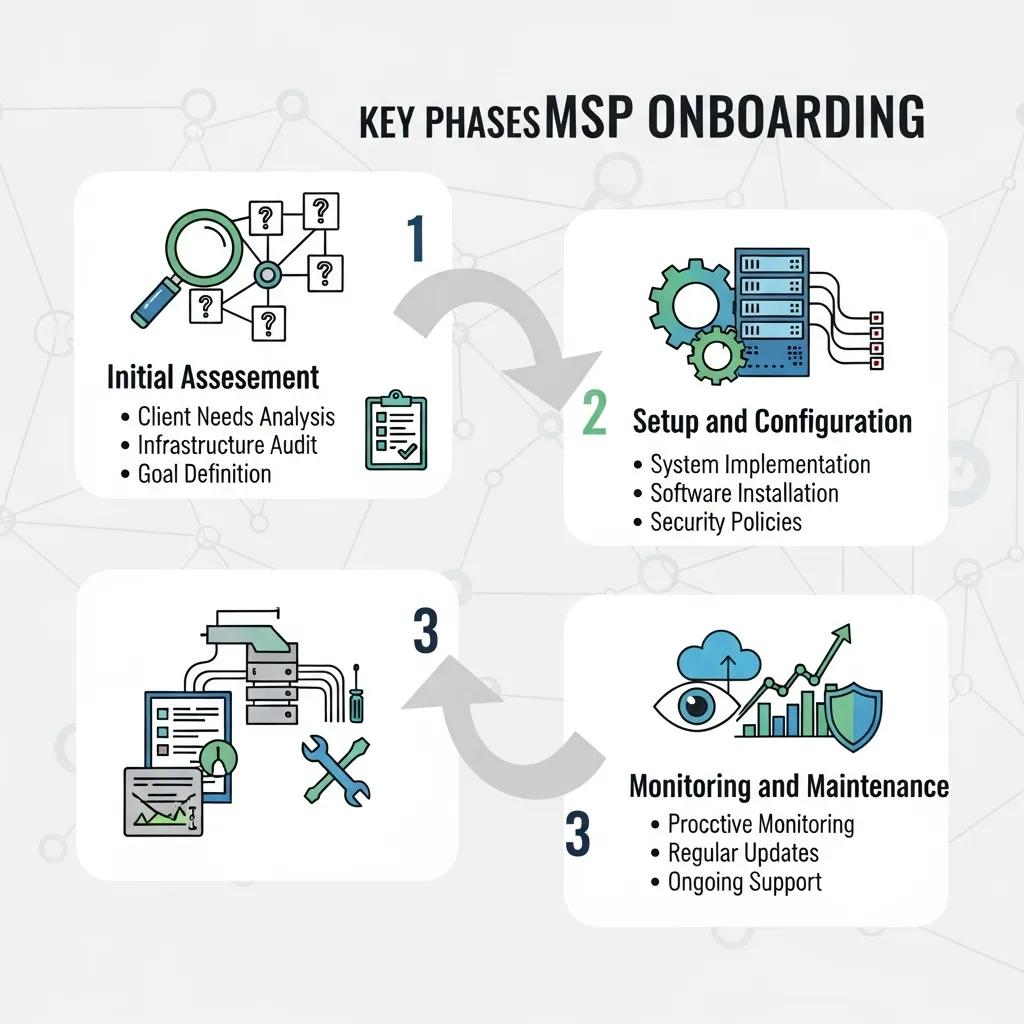
The first 90 days of onboarding a managed service provider (MSP) can be broken down into several key phases:
- Initial Assessment: This phase involves a comprehensive evaluation of the existing IT infrastructure, identifying strengths and weaknesses.
- Setup and Configuration: During this phase, the new IT systems are set up, and configurations are tailored to meet the specific needs of the business.
- Monitoring and Maintenance: After the initial setup, ongoing monitoring and maintenance ensure that systems operate smoothly and efficiently.
These phases are crucial for establishing a solid foundation for the ongoing relationship between the business and the IT provider.
How Does a Managed Service Provider Support Small Businesses During Onboarding?
Managed service providers offer extensive support to small businesses during the onboarding process. This support typically includes:
- Initial Consulting: MSPs provide expert advice on best practices and strategies tailored to the business’s unique needs.
- Setup and Configuration: They assist in configuring systems to ensure optimal performance and security.
- Training: MSPs often offer training sessions for staff to familiarize them with new systems and processes.
This comprehensive support helps small businesses navigate the complexities of transitioning to a new IT provider.
How to Prepare for a Smooth IT Provider Transition?
Preparing for a smooth transition to a new IT provider involves several proactive steps:
- Assess Your Current IT Environment: Understand the existing systems and identify areas that require improvement.
- Schedule a Consultation: Engage with the new IT provider early to discuss expectations and requirements.
- Plan the Transition: Develop a detailed plan that outlines the steps involved in the transition, including timelines and responsibilities.
By taking these steps, businesses can set the stage for a successful onboarding experience.
What Should Be Included in an IT Provider Transition Checklist?

An effective IT provider transition checklist should encompass several essential items to ensure a smooth process:
This checklist serves as a valuable tool for businesses to track their progress and ensure that all critical aspects of the transition are addressed.
Research supports the effectiveness of structured onboarding, highlighting how comprehensive checklists and improved communication can lead to better outcomes.
Implementing Structured 30-60-90 Day Onboarding Checklists
Interventions: Mixed methods were used to inform the development of new employee onboarding for novice clinical trial nurses utilizing a structured 30-60-90-day checklist, improved communication channels, and continuous mentor support. Measures: Monthly quality queries and quarterly staff turnover rates were tracked. Employee feedback was collected to assess the interventions’ impact. Results: The number of quality queries was reduced by 62.9% from 786 to 495, and the turnover rate decreased from 30% to 20% within the intervention period.
Clinical Trial Research Nurse New Employee Onboarding 30-60-90 Day Checklist, 2024
How Can Businesses Minimize Downtime When Switching Managed IT Services?
Minimizing downtime during the transition to a new managed IT service provider is crucial for maintaining business continuity. Here are some strategies to consider:
- Proactive Problem-Solving: Anticipate potential issues and develop contingency plans.
- Seamless Updates: Schedule updates during off-peak hours to reduce the impact on daily operations.
- Expert Support: Leverage the expertise of the new IT provider to address challenges quickly.
Implementing these strategies can significantly reduce the risk of downtime during the transition.
What to Expect in the First 30 Days With a New IT Provider?
The first 30 days with a new IT provider are critical for establishing a successful partnership. During this period, businesses can expect:
- Initial Assessment: A thorough evaluation of the IT environment to identify immediate needs.
- Setup and Configuration: Implementation of new systems and configurations tailored to the business.
- Proactive Monitoring: Continuous monitoring to ensure systems are functioning optimally.
This initial phase sets the tone for the ongoing relationship and helps build trust between the business and the IT provider.
How Is the IT Environment Assessed and Configured?
Assessing and configuring the IT environment involves several key steps:
- Schedule a Consultation: Meet with the IT provider to discuss current systems and future needs.
- Seamless Deployment: Implement new systems with minimal disruption to business operations.
- Ongoing Support: Establish a support framework to address any issues that arise post-deployment.
This structured approach ensures that the IT environment is optimized for performance and security.
What Communication Practices Ensure Transparency During Early Onboarding?
Effective communication is vital during the onboarding process to ensure transparency and build trust. Key practices include:
- Regular Updates: Keep all stakeholders informed about progress and any changes to the plan.
- Clear Communication Channels: Establish designated points of contact for questions and concerns.
- Feedback Mechanisms: Encourage feedback from staff to identify areas for improvement.
These practices foster a collaborative environment and help address any issues promptly.
What Happens Between Days 31 and 60 During MSP Onboarding?
During the second phase of onboarding, which spans days 31 to 60, businesses can expect continued support and optimization efforts. Key activities include:
- Continued Support: Ongoing assistance from the IT provider to address any emerging issues.
- System Optimization: Fine-tuning systems based on feedback and performance metrics.
- Client Feedback: Gathering input from staff to ensure that the new systems meet their needs.
This phase is crucial for solidifying the relationship and ensuring that the IT environment is functioning effectively.
How Is IT Service Migration Executed to Ensure Continuity?
Executing IT service migration requires careful planning and execution to ensure continuity. Key steps include:
- Pre-Migration Planning: Develop a detailed migration plan that outlines the process and timelines.
- Network Mapping: Identify all components of the IT environment to ensure a smooth transition.
- Testing and Validation: Conduct thorough testing to confirm that all systems are functioning as expected post-migration.
These steps help minimize disruptions and ensure a successful migration.
What Are Common Challenges and How Are They Addressed?
Common challenges during the onboarding process can include:
- Cybersecurity Threats: Addressing potential vulnerabilities in the IT environment.
- Operational Inefficiencies: Identifying and resolving inefficiencies in workflows.
- Compliance Issues: Ensuring that all systems meet regulatory requirements.
By proactively addressing these challenges, businesses can enhance the onboarding experience and ensure a successful transition.
How Does the Onboarding Process Continue From Days 61 to 90?
The onboarding process continues to evolve during days 61 to 90, focusing on long-term support and optimization. Key aspects include:
- Ongoing Support: Continued assistance from the IT provider to address any issues that arise.
- Performance Optimization: Regular assessments to identify areas for improvement.
- Client Engagement: Maintaining open lines of communication to ensure that the IT environment meets business needs.
This phase is essential for establishing a sustainable partnership between the business and the IT provider.
What Optimization Steps Improve IT Service Performance?
To enhance IT service performance, businesses should consider the following optimization steps:
- Proactive IT Management: Regularly monitor systems to identify and address potential issues.
- Regular Software Updates: Keep all software up to date to ensure security and functionality.
- Enhanced Security Measures: Implement robust security protocols to protect sensitive data.
These steps contribute to a more efficient and secure IT environment.
How Is Post-Onboarding Support Structured for Small Businesses?
Post-onboarding support is crucial for small businesses to ensure ongoing success. Key components include:
- Ongoing Support: Access to technical assistance as needed.
- Expert Assistance: Availability of IT professionals to address complex issues.
- Proactive IT Maintenance: Regular check-ins to ensure systems are functioning optimally.
This structured support helps small businesses navigate the complexities of their IT environments effectively.
What Are Frequently Asked Questions About MSP Onboarding?
Businesses often have questions about the onboarding process, including:
- What to expect during onboarding?: Expect a structured process that includes assessments, setup, and ongoing support.
- How to communicate with the provider?: Establish clear communication channels for updates and feedback.
- What support is available?: Access to technical assistance and ongoing maintenance is typically provided.
These FAQs help clarify the onboarding process and set expectations for businesses.
What Should Clients Expect Regarding Communication and Reporting?
Effective communication and reporting are essential for a successful onboarding experience. Clients should expect:
- Regular Communication: Frequent updates on progress and any changes to the plan.
- Reporting Structures: Clear reporting mechanisms to track performance and address issues.
- Feedback Opportunities: Opportunities for clients to provide input and feedback on the onboarding process.
These elements contribute to a transparent and collaborative onboarding experience.
How Does Cornerstone BTI Ensure a Successful Onboarding Experience?
Cornerstone BTI is dedicated to ensuring a successful onboarding experience for its clients. Key strategies include:
- Consultation Process: Engaging with clients to understand their unique needs and expectations.
- Deployment Strategies: Implementing tailored deployment plans that minimize disruption.
- Ongoing Support: Providing continuous assistance to address any challenges that arise post-onboarding.
By focusing on these areas, Cornerstone BTI helps businesses navigate the complexities of transitioning to managed IT services effectively.